AV system design
AV system design software from signal flow to rack faceplates.
Audio visual design software that plans the full technical stack in one place: diagram the path, elevation the racks, size the LED wall, and export a crew-ready packet before show day.
- Diagram Builder for video, audio, and network signal logic
- Rack elevation software with front/rear views and internal patch documentation
- LED wall calculator for cabinet count, pixel load, and data/power paths
- Gear lists and cable schedules generated from the same project data
- Team sharing and read-only links for clients, venues, and freelancers
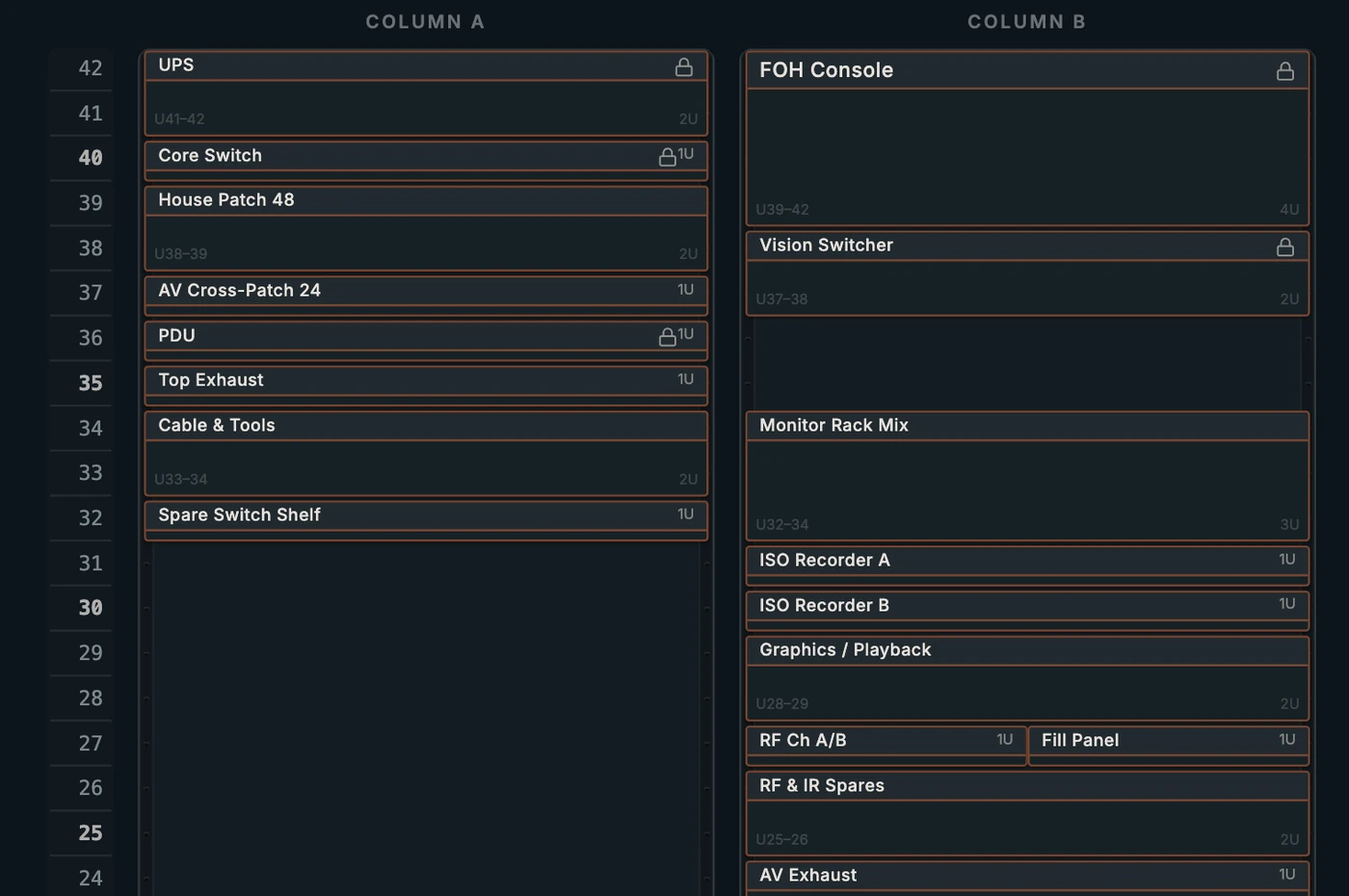
The whole system design in one workspace
Most AV system designs live in four tools that don't talk to each other: a diagram in one, rack layouts in a spreadsheet, LED wall math on a napkin, and the gear list wherever the last version got emailed. WireFlow holds the signal flow, the rack elevations, the wall plan, and the gear list in one project. Change the design and the documentation follows.
Rack elevations that match the diagram
Place devices into racks with front and rear views, document the internal patch, and export install-ready PDFs. Because the rack pulls from the same project as the diagram, the amp in slot 12 is the same amp the signal flow feeds, no re-entering gear in a second tool.
LED walls with real math
Size a wall in cabinets, not guesses: cabinet grids, pixel maps, power draw, and data paths, with processor limits accounted for in the plan. The wall plan exports alongside the wiring so the LED crew and the video crew are reading the same document.
Gear lists and cable schedules: generated, not typed
Every device and every wire in the design rolls up into a bill of materials and a cable schedule automatically. Quote from it, purchase from it, prep the truck from it, all as CSV so it lands in whatever spreadsheet your operation already runs on.
Hand off cleanly
Export a PDF tech packet for the client, send read-only share links to the crew, and duplicate the project when the next revision or the next show comes around. The design stays yours: everything exports to standard files.
Frequently asked questions
- Is WireFlow a CAD replacement?
- No, and it isn't trying to be. CAD earns its seat for construction drawings. WireFlow covers the rest of AV system design: signal logic, rack planning, LED wall math, gear lists, and the crew-facing documentation, at a fraction of the cost and learning curve.
- Can integrators use it for quoting?
- Yes. The bill of materials generates from the design itself, so the quote reflects what's actually drawn. Export to CSV and price it in your own sheet.
- Can I put my company's brand on exports?
- The Studio tier adds a custom brand kit: your logo and colors on every PDF and PNG export, so client-facing packets look like they came from your shop.
- Does WireFlow support teams?
- Pro covers unlimited sharing via read-only links. The Team plan adds a shared workspace for production companies and rental shops, with live co-editing in early access.
- How do I manage design revisions?
- Projects autosave to the cloud, and you can duplicate a project to branch a revision. Keep the approved design intact while you explore the change order.
- What does it cost to start?
- Free. Three editable diagrams and the device library, no card required. Pro at $14.99/month unlocks racks, LED walls, and unlimited projects.