AV diagram software
AV diagram software built for crews, not generic boxes and lines.
WireFlow validates ports, tracks signal paths, and exports crew-ready tech packs from one cloud workspace. Start free with three editable diagrams.
- Connection-aware ports: SDI, HDMI, Dante, AES, and network types block incompatible patches
- Device library with AV-native presets plus your own templates
- Wiring plans and cable schedules pulled from the same diagram data
- Share read-only links with freelancers and venue techs, no account required
- PNG and PDF exports for load-in packets
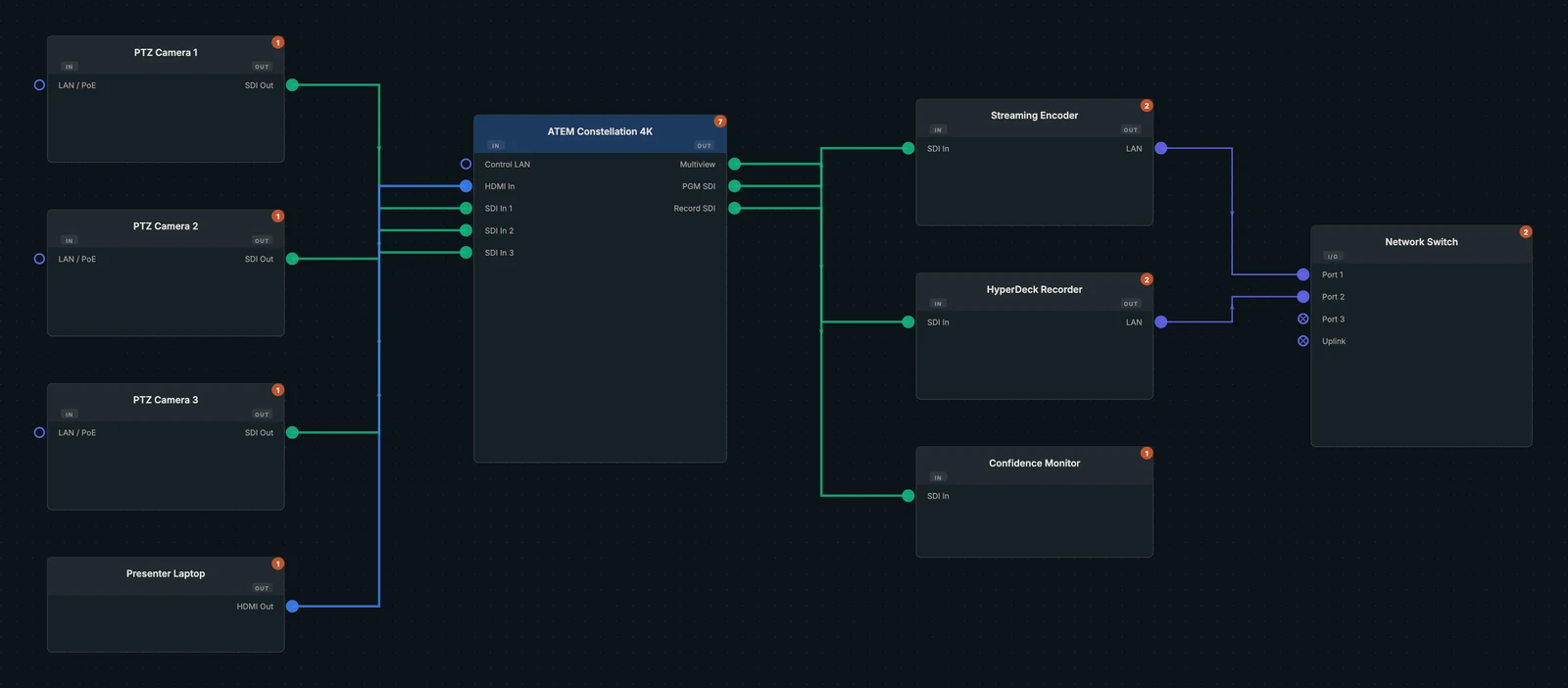
Why generic diagram tools fail AV crews
Visio, Lucidchart, and draw.io treat a production switcher the same way they treat a database icon: a rectangle with anchor points. They will happily let you land an HDMI output on an SDI input, run Dante into a DMX port, or leave a camera with no return path, and nobody finds out until a tech is staring at the back of a rack twenty minutes before doors.
WireFlow is diagram software built specifically for AV and live production. Every device carries real ports, every wire knows its signal type, and the mistakes that used to surface at load-in get caught while the show is still a plan.
Connection-aware wiring catches mistakes in prepro
Draw a connection in WireFlow and it validates the patch as you make it. HDMI cannot land on SDI. Dante stays on network ports. XLR, DMX, DisplayPort, NDI, USB, and fiber each enforce their own rules, and your crew sees the same rules when they open the share link.
- Port-aware devices: outputs only connect to compatible inputs
- Signal-path tracing from source to screen across every hop
- Cable types and labels that carry through to wiring plans and schedules
One diagram becomes the whole tech pack
The diagram is the source of truth. From it, WireFlow generates the cable schedule, the gear list, and the wiring plan, then packages them as PDF tech packs and CSV exports your crew, your client, and your procurement spreadsheet can actually use.
- One-click cable schedule and bill of materials (CSV)
- PDF tech packs, no redrawing in another tool
- Read-only share links that open on any phone at load-in
Part of a full preproduction workspace
Wiring diagrams are the start. The same project holds rack elevations with front and rear views, LED wall plans with cabinet grids and power and data paths, and gear lists that update as the design changes, so the packet you hand the crew describes one coherent system, not four documents that drifted apart.
Who plans shows in WireFlow
Production companies documenting recurring shows. Freelancers who need a professional packet without a CAD seat. Houses of worship building documentation a volunteer can follow. Integrators sketching systems before the formal drawing set. Broadcast teams mapping SDI plants and flypacks. If your work ends with gear in a truck and a crew on a clock, this is built for you.
Frequently asked questions
- Is WireFlow free to use?
- The free plan includes three editable diagrams, five custom devices, the full preset device library, PNG export, and one shared read-only link, no credit card required. Pro unlocks unlimited diagrams, LED walls, rack elevations, and clean PDF/CSV exports at $14.99/month.
- Can I import my Visio or Lucidchart diagrams?
- There is no direct importer. Most crews rebuild a show file in an afternoon using the device library, and the rebuilt version validates every patch instead of just redrawing the shapes.
- Does my crew need accounts to see the diagram?
- No. Read-only share links open in any browser on any device, and they always show the latest saved version, no more v7_FINAL_final.pdf in an email thread.
- Can I add my own gear?
- Yes. Build custom devices with your own ports, photos, and presets. Pro members can also import crew-tested devices from the community library and publish their own.
- What connector types does WireFlow validate?
- HDMI, SDI, XLR, RJ45/network (including Dante and NDI traffic), USB, DMX, DisplayPort, and fiber. Incompatible patches are blocked as you draw, not discovered at load-in.
- Does it work on an iPad?
- Yes. WireFlow runs in the browser with cloud autosave across desktop, iPad, and mobile, so the plan you built at the shop is the plan on the tablet at load-in.